Shoppers who use your store's search bar convert at significantly higher rates than those who browse without it. Constructor's research found that searchers convert at 2.5X the rate of non-searchers. Yet most ecommerce managers have no idea whether their search is actually performing well or quietly hemorrhaging revenue every day.
That uncertainty is the real problem. "Is our search good?" is a question most teams can't answer without a methodology for measuring it. A gut feeling that results "seem relevant" is not a quality audit. Neither is checking whether the search box works at all.
This article introduces a concrete, 8-dimension framework for scoring ecommerce search quality, aligned with the methodology behind XTAL's Site Search Grader. By the end, you'll know what dimensions matter, what the letter grades mean, and what failure looks like in each area. Whether your current score is an A or an F, you'll know exactly where to focus.
The 8 Dimensions of Ecommerce Search Quality
A meaningful ecommerce search score must cover the full span of the shopper's search experience, from the moment they type a query to the moment they (hopefully) add something to their cart. Measuring only relevance misses half the picture. Measuring only speed misses the other half.
Here are the eight dimensions used to calculate a complete search quality score:
1. Relevance
Are the results actually relevant to what the shopper typed? This is the foundational dimension. A search for "white running shoes women size 8" should surface white women's running shoes, not black boots or men's sneakers. Poor relevance is the single fastest way to lose a sale.
2. Natural Language Understanding (NLP)
Can the search engine interpret intent, not just keywords? A query like "something for a cozy night in" or "gift under $50 for a dog lover" expresses intent without exact product keywords. NLP capability (understanding synonyms, modifiers, and semantic meaning) is what separates modern AI-powered search from legacy keyword matching. For a deeper look at how this works under the hood, see our breakdown of semantic search vs. keyword search.
NLP is a grade gatekeeper in practice: it carries 12% of the composite score, and stores that fail it almost always fail high-intent long-tail queries too. No store we have graded with a failing NLP score has reached the A band.
3. Zero-Result Handling
What happens when a search returns no results? A Google Cloud commissioned Harris Poll survey found that 80% of shoppers globally agreed they were more likely to leave a retail site and purchase elsewhere after an unsuccessful search experience. That's not a bounce-rate problem; it's a revenue leak with a direct cause. Good zero-result handling means offering fallbacks: alternative spellings, related categories, or "did you mean?" suggestions that keep the shopper on the page.
4. Typo Tolerance
Real shoppers make typos. "Shampo," "cofee maker," "runninh shoes." These are real queries real people type. A search engine that returns nothing for a common misspelling fails the shopper for no good reason. Typo tolerance (also called fuzzy matching) is a basic expectation, and its absence costs far more in lost sales than it would cost to implement.
5. Synonym Handling
Shoppers rarely use your catalog's exact vocabulary. One person searches "couch" while your product feed says "sofa." Another types "sneakers" when the catalog says "trainers." A search engine that treats these as unrelated strings hides in-stock inventory from shoppers who are actively trying to buy it. Good synonym handling maps everyday language to catalog language automatically, without a merchandiser maintaining synonym lists by hand.
6. Long-tail Specificity
Multi-attribute queries like "blue linen tablecloth 60 inch" are the highest-intent searches a store receives. The shopper knows exactly what they want. Weak engines either return nothing because no product matches every word, or ignore the attributes and dump the whole category. Handling the long tail well means honoring each attribute the shopper specified and relaxing gracefully when there is no exact match.
7. Speed & Performance
Search should feel instant, and avoidable delays create noticeable friction. This dimension covers both raw response time and perceived performance, including whether the UI shows loading states, renders progressively, or blocks the entire page while waiting.
8. Category Intelligence
Broad queries like "desk accessories" or "summer dresses" are category intents typed into a search box. A strong engine returns a representative assortment across the category. A weak one keyword-matches the phrase and returns a near-random subset, or nothing at all. Many shoppers use search instead of navigation, so category-style queries deserve category-quality results.
What the Letter Grades Actually Mean
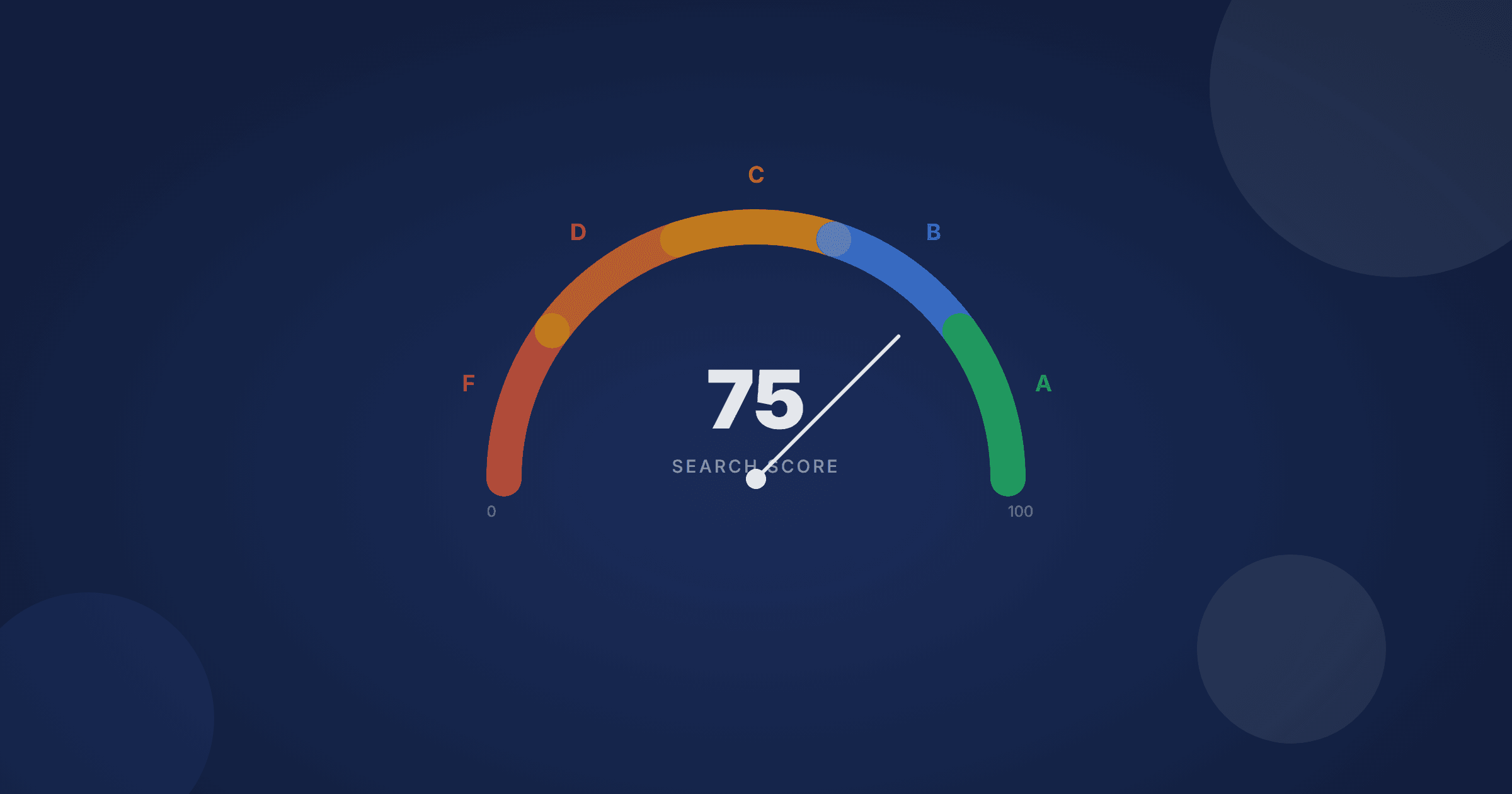
The 8 dimensions above are scored individually and rolled up into a composite 0–100 search quality score, which maps to a letter grade. Here's how to interpret each band:
A (80–100): Genuinely Competitive Search
An A-grade store has search that actively earns its keep. Relevant results, natural language understanding, strong typo tolerance, zero-result fallbacks. The full package. A-grade search is rare: most ecommerce stores score significantly lower because NLP alone (12% of the composite score) is where even well-resourced teams frequently fall short.
B (60–79): Functional but Leaky
A B-grade search works well enough that most shoppers won't rage-quit, but there are meaningful gaps. Common B-grade profiles include strong relevance but poor NLP, or strong typo tolerance paired with long-tail queries that return nothing. Revenue is being left on the table, but it isn't immediately obvious where.
C (40–59): Noticeably Broken in Places
C-grade stores have search problems that shoppers notice. Zero-result pages with no fallback, synonyms that go unrecognized, or a complete inability to handle any query that isn't an exact product name or SKU. At these stores, a meaningful share of shoppers who try to search end up abandoning rather than browsing to a result.
D (20–39): Search as a Liability
D-grade search creates negative brand impressions. When your search is this broken, it's worse than having no search bar at all. It sets an expectation and then violently fails to meet it. Typo intolerance, irrelevant results, and unhandled synonyms are typical markers.
F (Below 20): Non-Functional
An F score means the search experience is so broken it cannot be considered a functional feature. This is rare for established stores, but common in migrations where a new platform was deployed without validating that search configurations carried over correctly.
Common Failure Patterns by Dimension
Knowing the grade thresholds is useful. Knowing where stores most commonly fail is more useful. Here are the patterns that show up most often in search quality audits:
NLP is the most frequently failing dimension. Most stores running legacy keyword search (Shopify's default, WooCommerce's built-in, even many paid search apps) score a zero on NLP. They simply cannot parse intent. A query like "comfortable work-from-home chair" returns nothing, or returns chairs that happen to contain those individual words but aren't actually ergonomic desk chairs.
Zero-result handling is almost universally neglected. The majority of stores show a blank page or a generic "no results found" message with no next step. Most companies don't actively optimize or measure their on-site search at all, so this is unsurprising. But fixing zero-result handling alone can meaningfully lift engagement metrics.
Long-tail queries fail far more often than head terms. Stores that handle "sofa" fine frequently return nothing for "green velvet sofa under $1,000." Every attribute a shopper adds pushes a keyword engine closer to zero matches, so the highest-intent queries are the ones most likely to dead-end. Testing only your top search terms hides this failure mode entirely.
Speed degrades silently over time. A search integration that was fast at launch often slows down as the product catalog grows, as more re-ranking layers are added, or as infrastructure isn't scaled. Merchants rarely monitor search response times the same way they monitor page load times, so degradation goes unnoticed until it's severe.
See exactly where your search is failing
The XTAL Site Search Grader scores your store across all 8 dimensions and tells you exactly what's dragging your score down.
Get your free search scoreWhy a Score — Not Just a Checklist
You might wonder why a composite score is more useful than a checklist of best practices. Checklists tell you what to do but not how much it matters or how urgently.
A score lets you make tradeoffs. If your NLP score is 0 and your speed score is 95, you know exactly where to direct effort: faster infrastructure is not the problem. If your relevance and NLP scores are both strong but your zero-result and long-tail scores are weak, that's a different prioritization conversation than if the opposite were true.
Think of it like the HubSpot Website Grader, a tool that turned a fuzzy question ("is my website good?") into a specific, actionable number with breakdowns by category. The score doesn't tell you how to fix things, but it tells you what to fix and in roughly what order. For deeper guidance on improving specific dimensions, see our ecommerce site search best practices guide.
The other advantage of a score is benchmarking. When you run the diagnostic against your store and see a 54, the question "is that good?" is answerable only in context. Your score becomes meaningful when compared against stores with similar catalogs and traffic profiles. A mid-market apparel brand with 3,000 SKUs faces different search challenges than an industrial parts distributor with 200,000. Whether specific catalog sizes correlate with specific failure patterns is still an open question we're investigating as more stores run the grader.
Turning a Score Into an Action Plan
If you've read this far, you already know you care about search quality. But a score by itself is just a number; its value comes from what you do with it.
The most effective approach is to start with the lowest-scoring dimension that has the highest revenue impact. For most stores, that means NLP or zero-result handling, because both directly affect whether high-intent shoppers find what they're looking for. Improving synonym coverage or speed matters too, but those tend to create incremental lift rather than step-change improvements.
Check whether your failures cluster around a single root cause. A store running Shopify's default search, for example, will typically score poorly on NLP, zero-results, and typo tolerance simultaneously — not because three things are broken, but because one thing (the search engine itself) lacks the capabilities to score well in any of those areas. The fix isn't three separate projects; it's one platform decision. We walk through that scenario in more detail in our guide for improving Shopify search without a developer.
The stores that improve fastest treat their search score the way they treat Core Web Vitals: as a recurring metric to check quarterly, not a one-time audit. Search quality drifts as catalogs change, as seasonal inventory shifts, and as customer query patterns evolve. A score that was accurate six months ago may not reflect today's reality.
You can audit your search quality in a few minutes to see where things stand today. The real payoff comes from making it a habit, not a one-off.
Get more like this
AI-powered ecommerce search insights, delivered monthly.
XTAL Team
Search Quality Research
Continue Reading

Ecommerce Site Search Best Practices: A Complete Guide
The definitive guide to ecommerce site search optimization, covering 12 actionable best practices to increase conversions, reduce zero-result searches, and improve the shopping experience.
Algolia Alternatives for Ecommerce in 2026
A vendor-neutral comparison of the best Algolia alternatives for ecommerce search, with honest pros, cons, and pricing for each platform.
Klevu vs Algolia vs XTAL: Honest Three-Way Comparison for Mid-Size Ecommerce
Updated July 2026: a three-way comparison of Klevu (now Athos Commerce), Algolia, and XTAL Search for mid-size ecommerce stores. Features, pricing, setup, and AI capabilities.